A detector score lands on your screen as a single number, and it's tempting to treat it like a grade. It isn't one. An AI detector for teachers is best used as a flashlight. It points at passages worth a closer look, and the real checking happens in drafts, notes and a conversation with the student.
This guide covers when it makes sense to run a check, how to read a score and sentence highlights, what to think about before you upload anyone's work, and a classroom workflow that keeps the score in its place.
How should teachers use an AI detector?
Use it as one prompt for a closer look, never as a verdict. Run a check only when something in the work already concerns you, using a tool your school approves. Read the overall score with its range and confidence, then look at which sentences are highlighted. Compare those passages with the student's drafts, version history and earlier writing, and talk to the student before you decide anything. The score alone never justifies a penalty.
Do teachers use AI detectors?
Yes, a lot of them do. In a survey of 460 grade 6 to 12 public school teachers taken in November and December 2023, the Center for Democracy and Technology (CDT) found that 68% regularly used an AI content detection tool, up 30 points on the previous school year. The same report found 78% said their school sanctioned the use of detection tools.
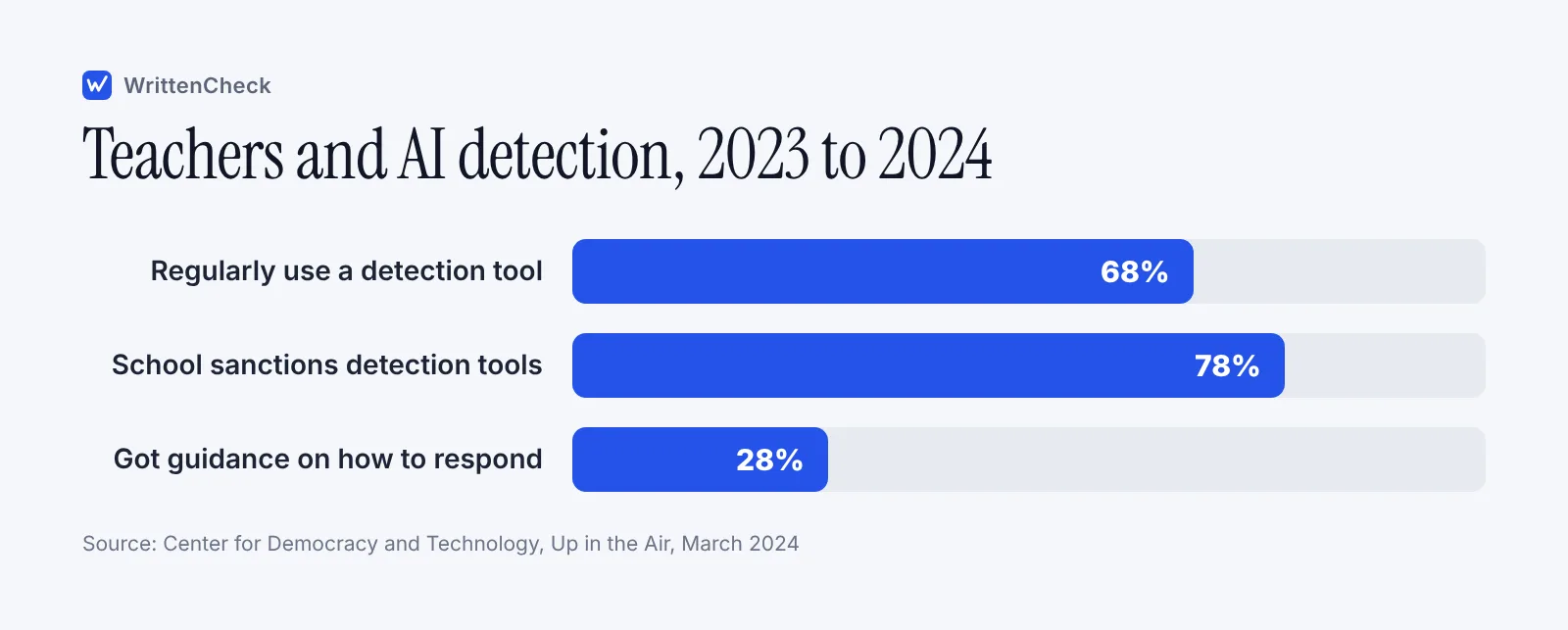
The gap is in support. Only 28% of those teachers had received guidance on how to respond if they suspected a student had used AI in ways that weren't allowed. The report also found that teachers who regularly used detection tools reported higher rates of student discipline, 72% compared with 48% of teachers who didn't use one.
CDT ran a later survey of 806 teachers in June to August 2025. With a different question, it found 43% regularly used AI content detection tools during the 2024 to 2025 school year and another 27% had experimented with them. The wording differs from the 2023 survey, so the two numbers aren't a clean trend line. What both show is that detectors are now an ordinary part of many teachers' week.
When should you run a check, and when shouldn't you?
An AI detector for teachers works best as a second look, after you've read the work yourself. Run a check when a specific piece of work gives you a specific reason to look. Don't run every essay through by default, and don't run text the tool can't judge well.
Situation | Run a check? | Why |
|---|---|---|
An essay breaks sharply from the student's earlier writing | Yes, as one input | It gives you passages to ask about |
Sources in the essay can't be found | Optional | The missing source is already better evidence |
A short answer under 80 words | No | Very short texts don't give a detector enough to go on |
A student writing in a second language | Only with extra caution | Research shows higher false-flag rates for these writers |
The assignment allowed AI for editing or drafting | Usually no | The score can't tell allowed use from banned use |
Every essay, as routine screening | No | You'll spend time chasing estimates instead of reading work |
Weak spots are a general feature of AI detection. Short texts, AI drafts that people have heavily edited, very formal human writing and second-language writing are all harder to judge. Our explainer on how AI detectors work shows why these cases trip models up.
How do you read an AI detector score and sentence highlights?
Read the score as the model's estimate that the text has AI-like patterns, along with how sure it is. It's not a measure of what share of the essay a machine wrote.
Most detectors give you some mix of the following:
An overall score. A single estimate for the whole text.
A likely range. The band the true value probably sits in. A wide range means the tool is less certain.
A confidence level. How much weight the tool itself thinks the estimate deserves.
Sentence scores and highlights. Which sentences read most like AI. These are the most useful part for a teacher because they tell you where to look.
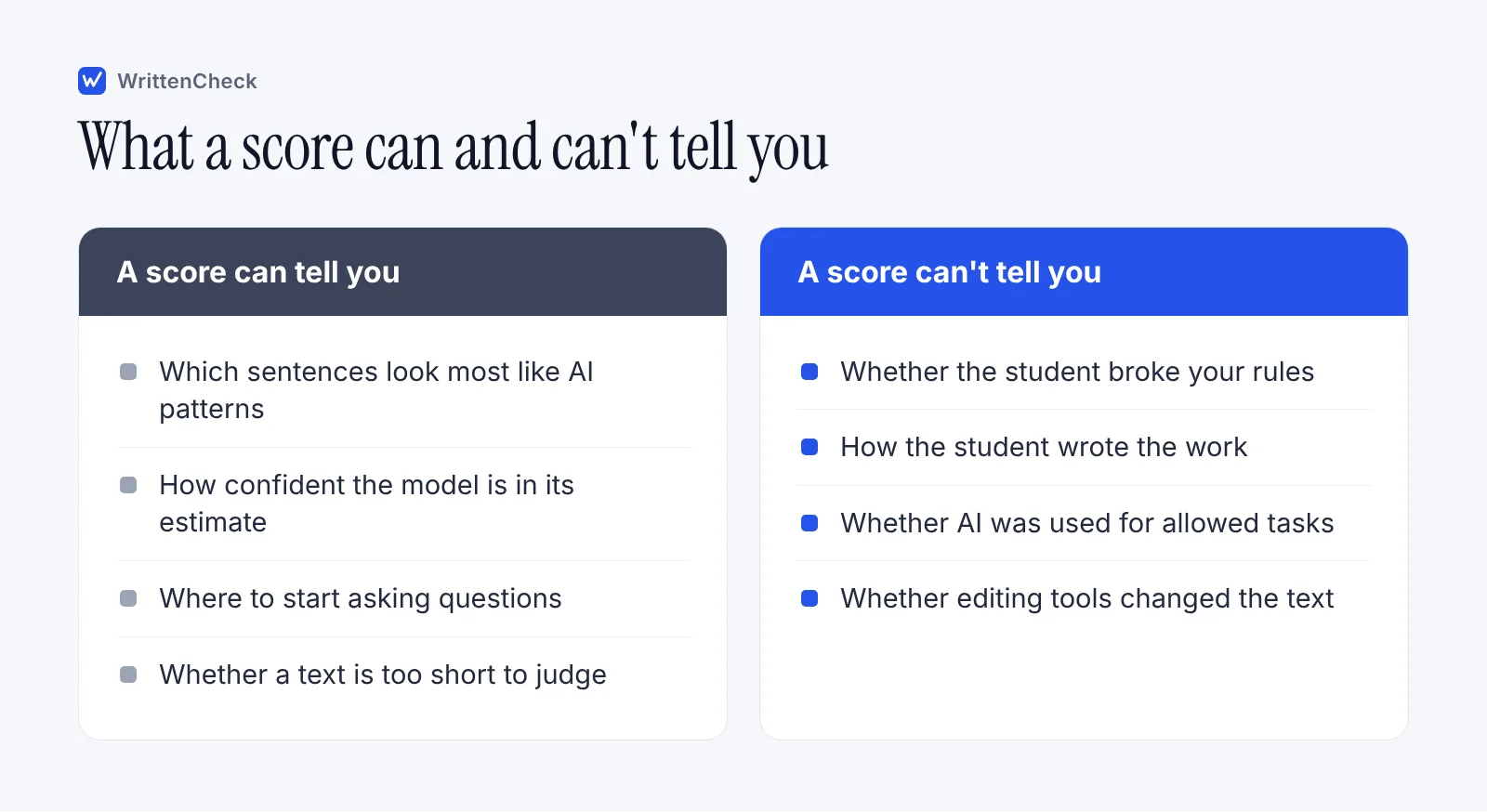
Here's how to work through a result. Say a history essay comes back with a high overall score and four highlighted sentences in the second section. Don't stop at the number. Open the student's version history and find when that section appeared. Check whether those sentences cite sources the student can explain. Look at whether that section is where the student pasted in a quote or a definition, which can look formal and generic. Each highlighted sentence becomes a question for the conversation, such as "Where did this idea come from?" or "Can you put this in your own words?"
A low score doesn't clear a student of anything either. It just means the tool didn't find strong patterns. If you have other evidence, it still counts.
Why should a score never be your only evidence?
Because detectors make mistakes, and some students bear more of them than others. A score can start an inquiry. It can't finish one.
In a 2023 study in Patterns, Weixin Liang and colleagues at Stanford tested seven AI detectors on human-written essays. The detectors misclassified essays by non-native English speakers written for the TOEFL as AI-generated 61.3% of the time on average, while essays by US eighth graders were classified almost perfectly. All seven detectors agreed on the wrong answer for 19.8% of the TOEFL essays.
University teaching centers have taken note. The University of Minnesota's guidance for faculty says it does not recommend AI detection tools and warns that students can be falsely accused. The Victorian Department of Education in Australia tells schools that detection tools can give inaccurate or inconclusive results, and to keep authenticating work in established ways, including asking students to explain how they completed an assessment.
For the student's side of this, our post on being falsely accused of using AI explains what students can show to support their account. It's useful to know what a fair process looks like from their chair. You can read are AI detectors accurate for a fuller look at error rates and why they vary.
How do you combine a score with process evidence?
Put the highlighted sentences side by side with how the work was built. Process evidence is what turns a suspicion into something you can discuss fairly.
Open the version history. In Google Docs you need edit access to see earlier versions. In Word, version history works for files saved in OneDrive or SharePoint. Find when the highlighted passages appeared and whether they arrived in one paste.
Check the planning trail. Notes, outlines, annotated readings and earlier drafts you commented on.
Compare with in-class writing. Anything the student wrote in your room is your clearest baseline.
Verify the sources. Look up each one cited in the highlighted sections.
Talk with the student. Ask them to walk you through the flagged parts and explain the ideas in their own words.
Our guide on how to tell if a student used AI has a full conversation script and a documentation checklist you can use for step 5.
What about privacy and student consent?
Treat student work as private by default and check your school's rules before you upload it anywhere. In many places, student work counts as a protected education record.
The University of Texas at Austin is direct about this. Its guidance says student work is an education record protected by FERPA, the US federal student privacy law, and that submitting it to AI detection tools without a university contract may violate the student's rights, even if the work is anonymized. The University of Minnesota's guidance raises the same concern and notes that students keep rights to their original work.
In practice, that means:
Use only detectors your school or district has approved, or ask your data protection lead before you use one.
Say in your syllabus or assignment sheet that work may be checked, and how.
Remove names and ID numbers before checking, while knowing that this alone may not meet your school's rules.
Never paste student work into a general AI chatbot to ask whether it was AI-written.
Keep any results with your other notes on the case, in a private folder.
If your school allows it, WrittenCheck was built with this concern in mind. Our detector runs on our own server, the text isn't sent to any other AI service and we don't keep it. If you upload a file, it's read in your browser and only its text is sent. Your school's policy still comes first.
What does a fair classroom workflow look like?
Rules first, process evidence always, detector rarely, conversation before any decision. Here's that order as steps you can adopt this term.
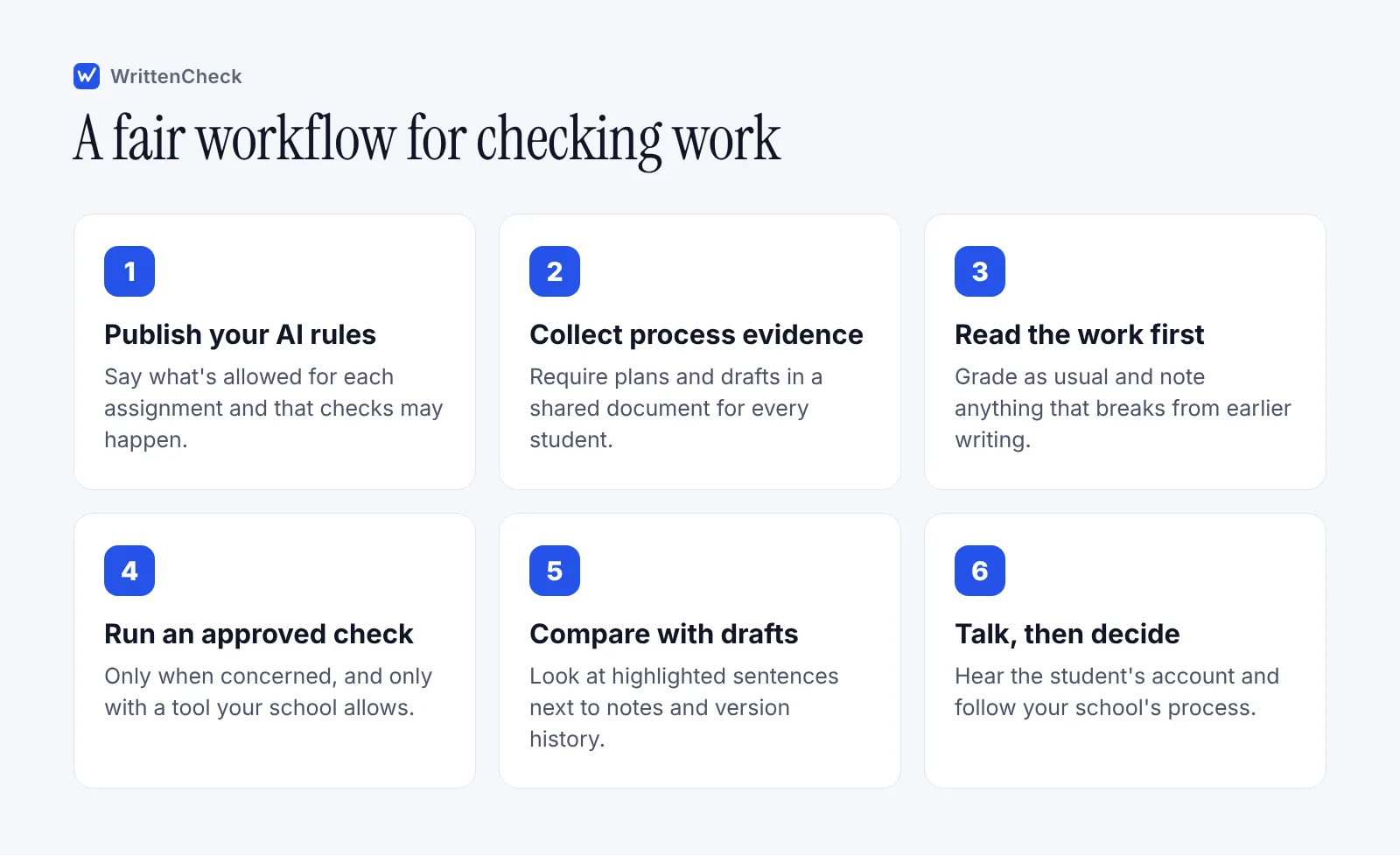
A few details make this work better:
Tell students the workflow. When they know you read drafts and talk to writers, many questions get answered before they're asked.
Write down each step. If a case goes further, notes made on the day are what everyone will want to see.
Use your school's process for outcomes. A detector check is something you do. A consequence is something your school's integrity policy decides.
What does WrittenCheck offer as an AI detector for teachers?
WrittenCheck is a free AI detector you can use from any browser. It checks 80 to 3,000 words at a time, so it fits most essays and short reports. You can paste text or upload a DOCX, PDF, TXT, ODT, RTF or HTML file.
It works in 16 languages, including English, Spanish, Arabic, Hindi, Urdu, Chinese and Japanese, which helps in multilingual classrooms. Each check gives you an overall score, a likely range, a confidence level and a score for every sentence, with the sentences that read most like AI highlighted. Like every detector, its scores are estimates and not proof, and it's weaker on short texts, heavily edited AI drafts, very formal human writing and second-language writing.
When a piece of work worries you and your school allows it, paste it into our free AI detector and use the highlighted sentences as your list of questions. You can also read how WrittenCheck works before you try it.
Frequently asked questions
Do teachers use AI detectors?
Many do. A Center for Democracy and Technology survey of 460 US grade 6 to 12 teachers in late 2023 found 68% regularly used an AI content detection tool. A later CDT survey, from mid 2025 and using different wording, found 43% regularly used one in the 2024 to 2025 school year, with another 27% having tried one. Few teachers in the 2023 survey had guidance on how to respond to suspected AI use.
What is a good AI checker for teachers?
Look for one your school approves, one that shows sentence-level highlights rather than only a single number, and one that is clear about what happens to the text you submit. A range and confidence level help you judge how much weight a result deserves. Whatever tool you use, treat its output as an estimate that points you toward questions, never as proof.
Can an AI detector prove a student cheated?
No. A detector estimates whether text has patterns common in AI writing. It can't see how the student worked, whether AI use was allowed for parts of the task, or whether grammar tools changed the wording. Research has also found much higher false-flag rates for some groups, such as non-native English writers. Proof comes from process evidence and the student's own account.
Is it legal to upload student essays to an AI detector?
It depends on where you teach and which tool you use. Some US universities, including the University of Texas at Austin, say student work is an education record under FERPA and shouldn't be submitted to detection tools without a contract. Check with your school or district before uploading any student work, and tell students in advance that checks may happen.
What score should make me worried?
There's no universal cut-off, and treating one number as a trigger leads to unfair calls. Look at the range and confidence along with the score, then read the highlighted sentences. A high score on a short or very formal text means less than a high score on a long essay that also breaks sharply from the student's earlier writing. Let the whole picture decide whether to talk with the student.
Should I tell students I use an AI detector?
Yes. Put it in your syllabus or assignment instructions along with your AI rules and the fact that you look at drafts. Students then know what to keep, such as notes and version history, and checks don't feel like an ambush. Being open about it also gives students a chance to ask what's allowed before they start, which prevents a lot of problems.
Sources
Up in the Air: Educators Juggling the Potential of Generative AI with Detection, Discipline, and Distrust, Center for Democracy and Technology, March 2024
Hand in Hand: Schools' Embrace of AI Connected to Increased Risks to Students (supporting slides), Center for Democracy and Technology, October 2025
GPT detectors are biased against non-native English writers, Patterns (Liang et al.), July 2023
What Faculty Should Know About GenAI Detectors, University of Minnesota, 2025
AI Detection Software Guidance, University of Texas at Austin, updated May 2026
Generative Artificial Intelligence: Promoting academic integrity, Victorian Department of Education, updated June 2025
Find what's changed in a file, Google Docs Editors Help, accessed October 2026
View previous versions of Office files, Microsoft Support, accessed October 2026


Comments