Most teachers who try an AI chatbot hit the same wall. The first lesson plan it gives you is generic, a little wrong for your class, and longer than you need. The good news is that AI for teachers works much better once you treat it like a fast teaching assistant who needs clear instructions and close checking.
The time savings can be real. In a spring 2025 Gallup survey of 2,232 US K-12 teachers, those who used AI weekly said it saved them about 5.9 hours a week. But 40% of those teachers didn't use AI at all, and only 19% said their school had a policy on it.
This guide covers the jobs where AI helps, prompts you can copy, the student data you should never paste in, and how to check what comes back.
How can teachers use AI?
Teachers can use AI to draft lesson plans, quiz questions, worksheets, leveled readings, rubrics, parent emails and feedback starters. The teacher supplies the goal, the class context and the standard, then checks and edits the draft. That's where AI for teachers earns its keep: routine writing, where it saves the most time. They're weakest on facts, local context and anything that needs judgment about a real student.
That's also what teachers report doing. Here's what Gallup and the Walton Family Foundation found when they asked teachers who use AI at least monthly what they use it for.
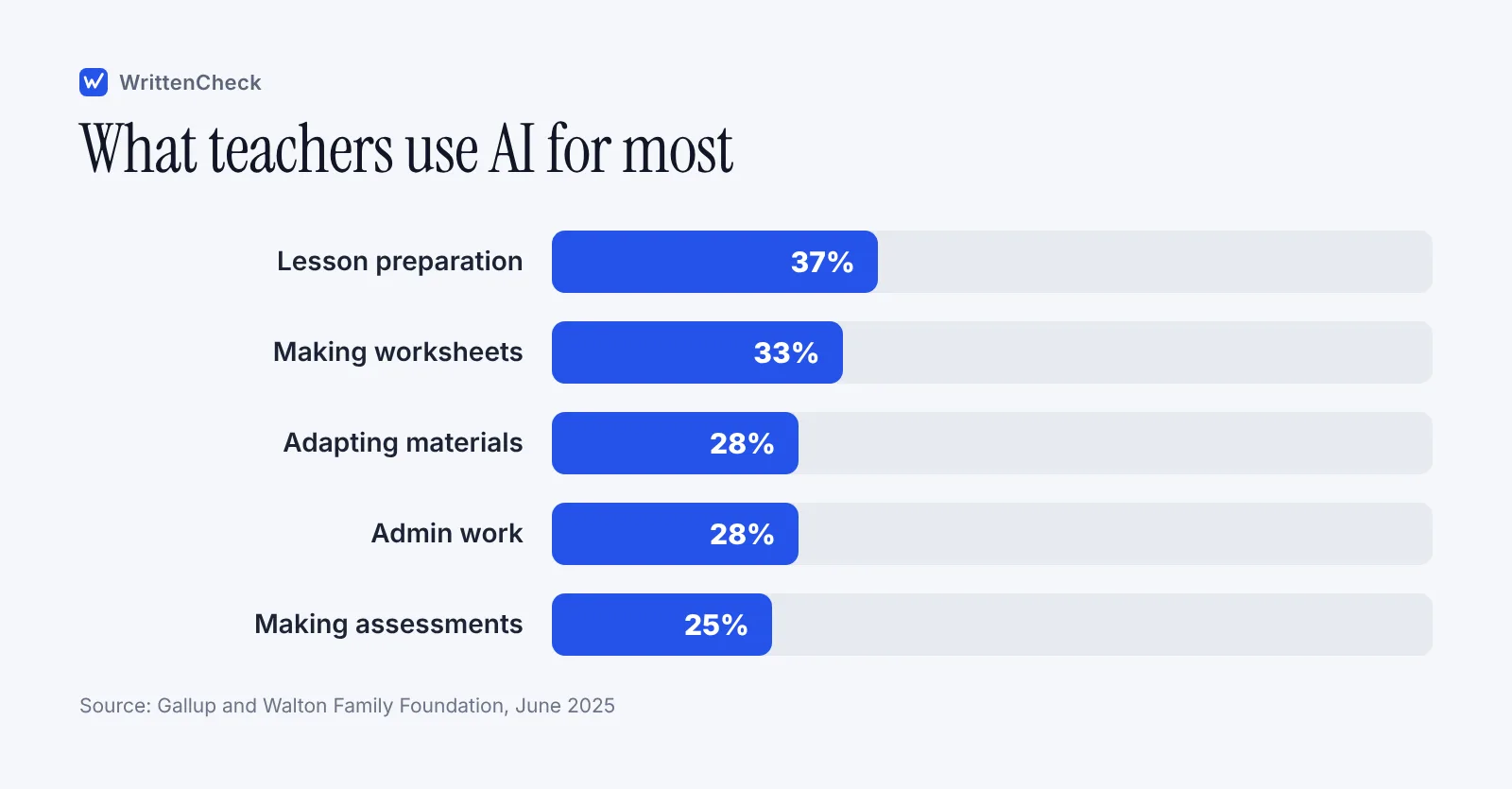
Some uses are still rare. Only 16% of teachers in that survey used AI for grading at least monthly. That's probably a healthy instinct, and we come back to it below.
Which jobs is AI for teachers good at, and which should you keep?
AI is good at producing a first draft of something you could write yourself but don't have time for. It's bad at knowing your students, your school's rules and whether a fact is true.
Task | AI is useful for | You still need to |
|---|---|---|
Lesson planning | A rough sequence, hooks, discussion questions | Match it to your standard and your class |
Quizzes and exit tickets | Many question variations on a text you choose | Check every answer key line by line |
Differentiation | The same passage at two or three reading levels | Check the facts didn't change between levels |
Rubrics | Clear wording for criteria you already set | Decide the criteria and weights yourself |
Feedback | Comment starters tied to your rubric | Read the work and write the final comment |
Parent emails | A plain, polite first draft | Remove jargon and add the personal detail |
Grading | Not a good fit | Grade it yourself |
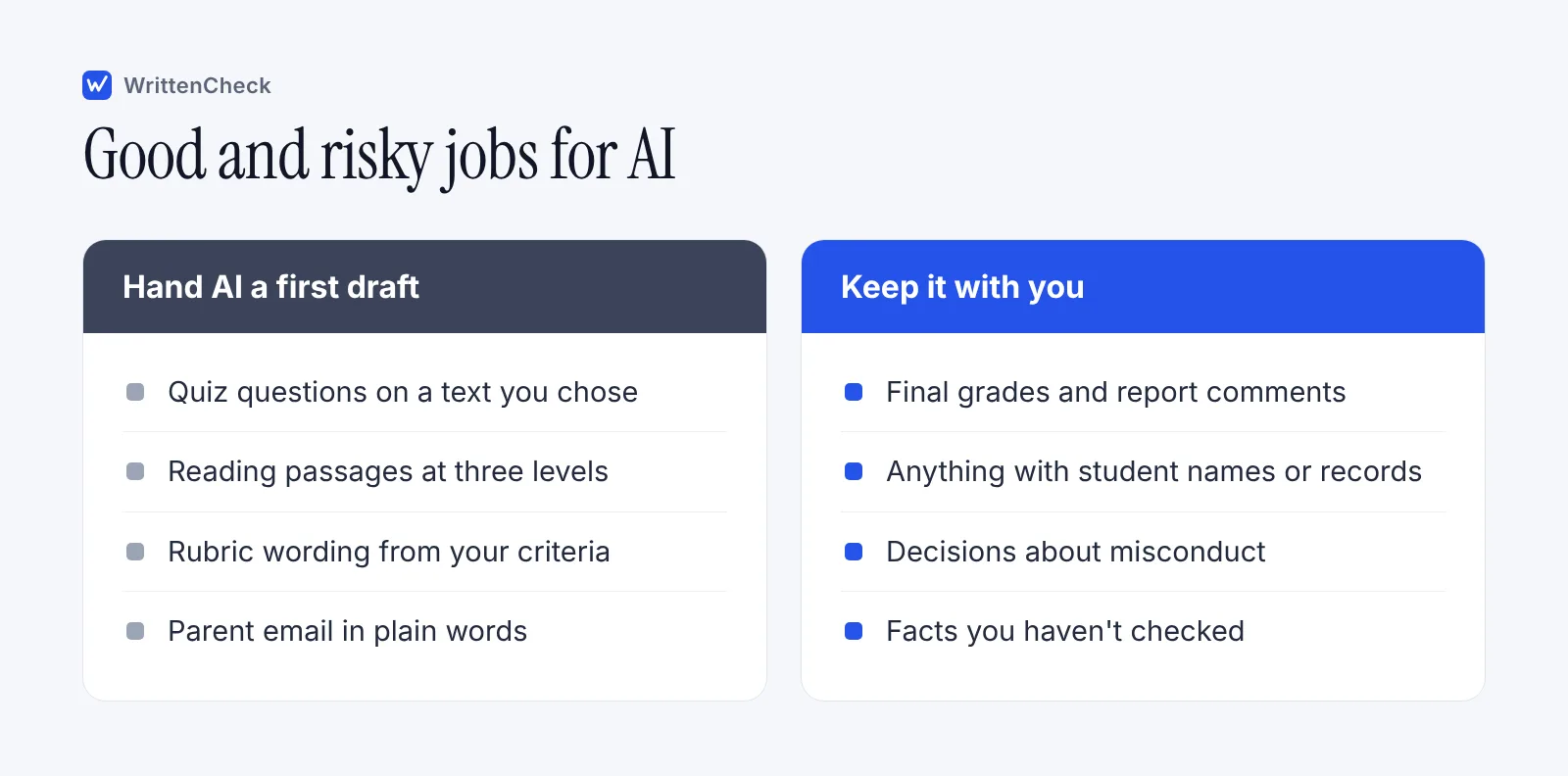
The pattern is simple. If you can check the output in a minute or two, AI saves time. If checking takes as long as writing it yourself, skip it.
What prompts work for AI lesson planning?
Prompts work when they include the grade, subject, standard or goal, time available, what students already know, and the format you want back. Without those, an AI chatbot fills the gaps with generic choices.
Here's a weak prompt and a stronger one for the same lesson.
Weak: Make a lesson plan about photosynthesis.
Stronger: I teach 7th grade science. Students know plants need sunlight and water but not the chemical inputs and outputs. Write a 45-minute lesson on photosynthesis with a 5-minute hook, a 15-minute guided activity using items found in a normal classroom, and a 3-question exit ticket. Use short sentences a 12-year-old can follow. Put the timings in a table.
The second prompt gives the tool a level, a starting point, a time box and a format. You'll still edit the result, but you'll be editing something close.
A few more prompts teachers can adapt:
Discussion questions. "Write 6 discussion questions on chapter 4 of [novel]. Two should ask for evidence from the text, two should ask students to disagree with a character, and two should connect to their own lives. 10th grade."
Misconception check. "List five common misconceptions 5th graders have about fractions, and for each one write a quick question that would reveal it."
Hook ideas. "Give me five 3-minute openers for a lesson on the causes of World War I. No videos. One should be a short role play."
How can AI help with differentiation and materials?
AI is quick at rewriting one text at several reading levels, adding sentence frames or turning notes into a worksheet. In the Gallup survey, 64% of teachers who used AI to adapt materials said it improved the quality of what they made for students.
Try prompts like these.
"Rewrite this passage at a 4th grade reading level and a 7th grade reading level. Keep all the facts and key vocabulary the same. Bold the vocabulary words." Then paste a passage you chose.
"Make sentence frames for students who are learning English to explain cause and effect in this passage."
"Turn these notes into a one-page worksheet with 5 fill-in-the-blank questions and 2 short-answer questions. Include an answer key."
Read the easier version against the original. Simplified rewrites sometimes drop a fact or change its meaning, and students reading the easier version deserve the same content as everyone else.
Can AI give students feedback?
AI can help you draft feedback faster, but it shouldn't replace your reading of the work. Use it to turn your quick notes into clear comments, or to suggest comment starters linked to your rubric.
Here's a safe workflow. You read the essay and jot "thesis vague, good evidence in para 2, no counterargument." Then you prompt:
Turn these notes into three short, kind, specific comments for a 9th grader. Start with what works. End with one thing to try in the next draft. Notes: thesis vague, good evidence in paragraph 2, no counterargument.
You never pasted the student's essay or name. The judgment is yours. The tool just did the wording.
Pasting whole essays into a public chatbot to "grade" them is riskier. The tool may miss what you care about, and you'd be sharing student work with a third party. If your school has an approved tool with a data agreement, follow its rules.
What should teachers never put into an AI tool?
Never paste anything that identifies a student into an AI tool your school hasn't approved. That includes names, ID numbers, grades, IEP or 504 details, health or family information, and behavior notes. Student essays with names on them count too.
The risk is real. In the Center for Democracy & Technology's survey on the 2023 to 2024 school year, 23% of US teachers in grades 6 to 12 said their school had a large-scale data breach. The US Department of Education's July 2025 AI guidance says K-12 AI work should be "in compliance with federal data privacy laws." UNESCO's 2023 guidance on generative AI in education also asks for data protection rules and recommends a minimum age of 13 for classroom use of AI tools.
Over-reliance is the other risk. AI chatbots make up facts and sources, which our guide to AI hallucination explains with examples. A worksheet with a wrong date or a made-up quote is worse than no worksheet.
How do you check AI output before students see it?
Check every AI draft for accuracy, level, bias and fit before it reaches students. Here's the routine we'd suggest.
Remove student details first. Do this before you paste anything.
Read every fact. Check dates, names, numbers and quotes against a source you trust.
Work every answer key. Solve the math problems yourself. AI keys are often wrong.
Check the level. Read it as one of your students would. Cut words they won't know.
Look for bias and gaps. Are the examples varied? Does anyone in the class get left out?
Edit it into your voice. Students know how you talk. Materials that sound like you land better.
Note what worked. Save good prompts so next week takes half the time.
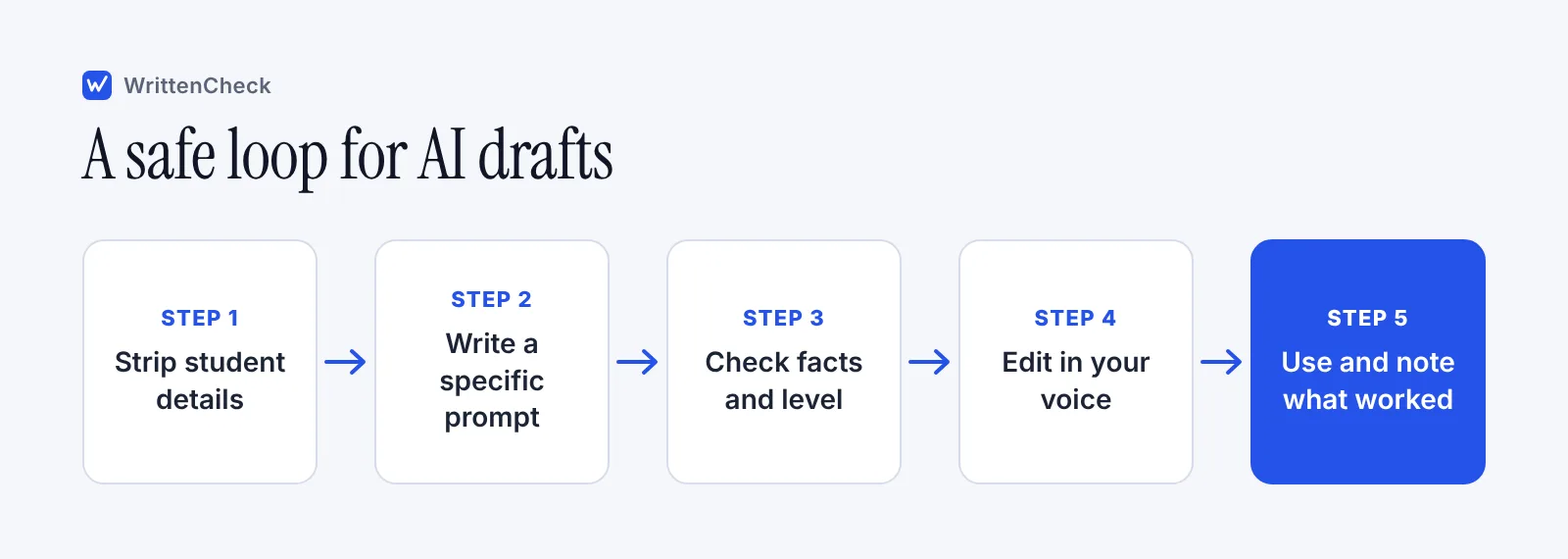
The US Department of Education's 2023 report on AI in teaching and learning put this idea at the top of its recommendations. It called for "humans in the loop," meaning teachers stay in charge of decisions and AI supports them.
How do you set expectations with students and families?
Tell students how you use AI and what they may use it for. If you're open about drafting a quiz with help, it's easier to ask students to be open about their own use.
The UNESCO AI competency framework for teachers, published in August 2024, lists 15 competencies across five areas, including ethics of AI and AI pedagogy. You don't need to master all of them before Monday. Start with a clear class rule.
Here's a sample line for a syllabus.
In this class, you may use AI tools to brainstorm and to check grammar. You may not use them to write any part of work you hand in. If you're unsure, ask me first. I use AI to help draft some quizzes and worksheets, and I check everything before you see it.
For school-wide rules, see our guide to writing an AI policy for schools. If you're also deciding how to respond when you suspect AI-written work, our guide to an AI detector for teachers covers what scores can and can't tell you. A detector score is a reason to look closer and talk with the student, never proof on its own.
If you want to see how a piece of writing reads, you can paste it into our free AI detector. It highlights the sentences that read most like AI, and we don't keep the text.
Frequently asked questions
Is AI for teachers worth the time to learn?
For many teachers, yes. In a spring 2025 Gallup survey of US K-12 teachers, weekly AI users reported saving about 5.9 hours a week, while monthly users reported about 2.9 hours. Savings depend on the task. Start with one routine job, like exit tickets or parent emails, and see whether checking the output is faster than writing it yourself.
What are the best AI tools for teachers?
When it comes to AI for teachers, the best tool is usually the one your school or district has approved, because it comes with a data agreement and clear rules. A general AI chatbot works for drafting materials that contain no student information. Before you use any tool, check who can see your inputs, whether they are stored, and whether the tool sets a minimum age for students.
Can I use AI to grade essays?
It's safer to grade essays yourself. AI tools can misjudge quality, miss what your rubric values and share student work with a third party. Only 16% of teachers in the 2025 Gallup survey used AI for grading at least monthly. A better use is to write your own notes, then ask an AI chatbot to turn them into clear comments without pasting the essay.
Is it okay to paste student work into an AI chatbot?
Only into a tool your school has approved for student data, and only under its rules. Public chatbots may store what you paste. Remove names and anything else that identifies a student first. Grades, IEP details, health information and behavior notes should never go into an unapproved tool, even with the name removed.
How do I write a good AI prompt for lesson planning?
Give the grade, subject, learning goal, what students already know, the time you have and the format you want back. Ask for several options so you can choose. Then edit. A prompt like "45-minute 7th grade lesson, 3-question exit ticket, timings in a table" gets a far more usable draft than "make a lesson plan."
Should I tell students I use AI?
Being open helps. If you explain that you use AI to draft some materials and check them yourself, students see what responsible use looks like. It also makes it fair to ask them to disclose their own use. Put your rule in the syllabus so students and families know where the line is.
Sources
The AI Dividend: New Survey Shows AI Is Helping Teachers Reclaim Valuable Time, Walton Family Foundation, June 2025
Teaching for Tomorrow: Unlocking Six Weeks a Year With AI, Gallup and Walton Family Foundation, June 2025
Student, teacher AI use continued to climb in 2023-24 school year, K-12 Dive, reporting Center for Democracy & Technology research, January 2025
Education Department issues AI priorities. But what if the agency closes?, K-12 Dive, July 2025
UNESCO: Governments must quickly regulate Generative AI in schools, UNESCO, September 2023
AI competency framework for teachers, UNESCO, August 2024
Education Department Issues Recommendations on AI, Inside Higher Ed, on the US Department of Education report "Artificial Intelligence and the Future of Teaching and Learning", May 2023


Comments